Search Engine Optimization is
the most common term in the web industry, this system helps you to
increase your websites organic traffic. Many are already discussed about
topic, but I have been following few different ways for organic
traffic. Take a look at the following steps I did shared all my blog
SEO standards and implement these , sure you will improve your blog
Google search results.
HTML Tags
Standard blog HTML syntax, article title should be inside
H1 tag. Read this for more help
Blog Design with CSS and HTML
//Header Part
<head>
<title>Article Title</title>
<meta name="description" content="Article Description Here"/>
</head>
//Article Part
<div>
<span>Article Published Time</span> <span><a href="#">Article Author</a></span>
<h1>Article Title</h1>
<p>
Article Content
</p>
<img src="" alt="Image Description"/>
</div>
Schema.org Validation
Structured data validation introduced by Google, Bing and Yandex search
engines, it supports a common set of schemas for structured markup data
on websites.
<div itemscope itemtype="http://schema.org/Blog">
<span itemprop="dateCreated">Article Published Time</span> <span itemprop="author"><a href="#">Article Author</a></span>
<h1 itemprop="name">Article Title</h1>
<p itemprop="description">
Article Content
</p>
<img src="" alt="Image Description"/>>
</div>
Google Plus Author
Modify with your Google Plus profile ID.
<a href="https://plus.google.com/xxxxxxxxxxxxx?rel=author" itemprop="author" rel="author me">Your Name</a>
Google Webmaster Tools and Data Highlighter
It is a Google search product, this allows webmasters to analyze search indexing status of their websites.
Click here create an account and add your website.
Step 1
Go to
Crawl ->
Sitemaps submit your website sitemap.xml
read this for more help.

9lessons.info is powered by blogger platform, so I just added
atom.xml
 Step 2
Few days back Google has introduced Web Data Highlighter, using this tool you can specify your website structure. Go to
Search Appearance ->
Data Highlighter ->
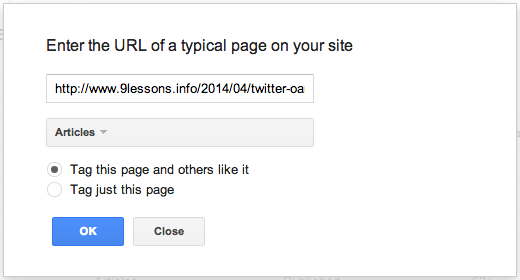
Start Highlighting submit any of your blog url and select Articles as a type of information to highlight.
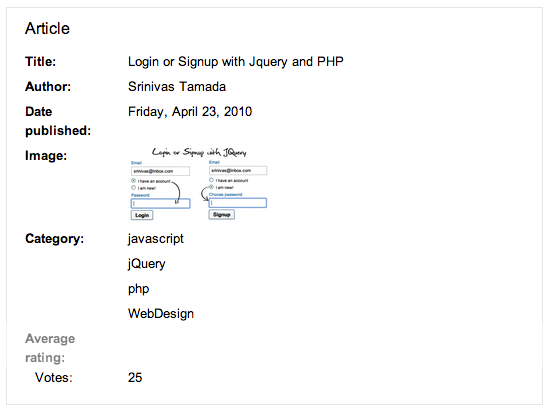
Select the article title and right click map to Title.

Choose published data.

Categories or Tags.

Article author

Finally Google data highlighter will crawl all these details.
 Google Analytics
Create a Google Analytics account
click here,
add your website and generate Universal Analytics tracking code or
modify the following code replace with UA code(Your Website ID). Include
this code above the end tag.
<script>
(function(i,s,o,g,r,a,m){i['GoogleAnalyticsObject']=r;i[r]=i[r]||function(){
(i[r].q=i[r].q||[]).push(arguments)},i[r].l=1*new Date();a=s.createElement(o),
m=s.getElementsByTagName(o)[0];a.async=1;a.src=g;m.parentNode.insertBefore(a,m)
})(window,document,'script','//www.google-analytics.com/analytics.js','ga');
ga('create', 'UA-XXXXX-X', 'Website Name');
ga('send', 'pageview');
</script>
Google Event Tracking
This helps you to measure how users interact with the content of your website or blog. I had implemented this for blog menu.
<a href="url" onclick="ga('send', 'event', 'button', 'click','lable');" >
Link
</a>


